|

-
Truimagz.com

width/height. top down view sim. depth
Hi guys.
Well I just finished up some jobs and now begining back progress on my top down rpg, I have got alot done, but now I am running into some tricky things with my maps.
First, I wont get into alot of stuff or reasons why I am doing certain things, but here is my question.
I want my maps to be hilly, you can see by the picture below.

and I am trying to think of ways to increase/decrease player size depending on the hills on my flat map.
now one Idea, pretty much the only idea I had so far was something like this.
create either a black and white or color layer to lay under my maps, and use some sort of get color method to see what color player is standing on, I figured go black and white so I could use something like....
if color is increased so is player scale, and if color is decreased so is player scale...
anyone ever attempted anything like this before?
here is an example of the above tile map with what I am talking about.

I know I would have to get more precise, but this is just an example
Now to me this sounds like the most logical way of doing such a thing but thought maybie someone here as tried this before?
any help or suggestions are greatly appreciated,,,, thank you.
Last edited by everfornever; 04-15-2007 at 04:37 AM.
-
http://en.wikipedia.org/?title=Heightfield
used in Flash
http://lab.parkstudio.ru/terra/
the trick is to show it from a different perspective, other than from plain top (that would hide the depth difference).
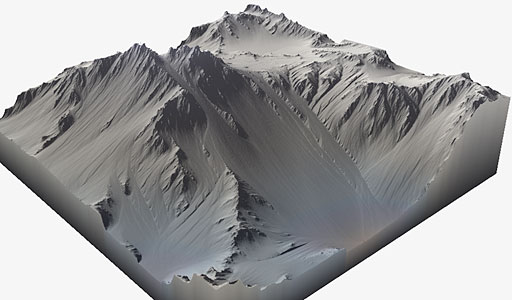
try some simple perspective shifting along the x-axis rotation just like Command % Conquer 1 & 2 or the Total Annihilation game. Seeing it slightly from the side and the top allows you then to slide the characters & items along the y-axis in flash to fake height & depth.
software:
http://terraineer.sourceforge.net/
http://www.world-machine.com/gallery.html
http://nemesis.thewavelength.net/index.php?p=8
http://www.localblooddrive.co.uk/
-
Script kiddie

Everfornever, I'd say just make a grayscale version of the map, and use getPixel() to find the colour of the point the player's standing on. Then just convert the colour value to a number; the bigger it is, the bigger the player should be. The range should be from 0 to 0xffffff (16,777,215).
-
Qwaizang:syntax_entity_

I have nothing against per-pixel calculations and heavy use of BitmapData, I wish more could be done without sacrificing framerate on lower-end machines. But if you want to simplify your engine so that it runs quickly, try using points nested within your terrain instead of another layer of graphics.
What I'm saying is, I think if you mapped out the summit of each hill and calculated proximity, you could achieve similar (if not the same) results.
Qwai•zang \kwî-'zan\ n [origin unknown] 1 : abstract designer, esp. of complex real-time experiments, c. 21st century
-
Truimagz.com
all very good points, just the kind of responses I was looking for, this gives me two things to play with now, I will see how the getPixel works since I want it to be extremely accurate, but I do undestand the point Q made.
Thank you guys. I am still working on the map itself at this point, but I will let you know the progress. If your curious how things are progressing check my current project in my sig.
-
M.D.

i dont follow Q_Hybrid, simply using getPixel on a astatic bitmap shouldn't effect performance at all, its just a lookup isn't it?
ever, i'd do what V said, full white should be the highest point possible, black being the lowest. Then simply find the percentage of gray you're at
var maxHeight = 200;
var color = heightMap.getPixel(hero._x, hero._y) >> 24 & 0xFF
var height = (color / 255) * maxHeight
hero._xscale = hero._yscale = height
-
Script kiddie
 Originally Posted by mr_malee
heightMap.getPixel(hero._x, hero._y) >> 24 & 0xFF
Showoff. 
 Posting Permissions
- You may not post new threads
- You may not post replies
- You may not post attachments
- You may not edit your posts
-
Forum Rules
|
Click Here to Expand Forum to Full Width

|


 Reply With Quote