|

-
Subservient Chicken
Hello All,
I'm sure everyone has seen the subservient chicken thing before:
http://www.subservientchicken.com/
Basically, there are about 400 different clips of the chicken doing random things. Depending on what you type into the field, the flash will load the movie that has been labled with the corresponding attributes.
I'm trying to accomplish something similiar in scope, where a keyword or phrase entered by the user would trigger or call a specific movie clip.
Any ideas on where/ how to begin?
Thanks in advance!
-
Senior Member

One way to do it would be to have a movieclip that contains a number of different sections, each with a different label. When you issue
gotoAndPlay('dance');
or
gotoAndPlay('jump');
It will jump to the appropriate label. At the end of the section there is a script that says
gotoAndPlay('idle');
which jumps to back to a basic idle loop.
To process the text, you can do something like:
code:
myTextInput.onChanged = function()

{

  if (this.text.indexOf('dance') >= 0)

  {

    // text contains the word 'dance'

    gotoAndPlay('dance');

  }

  else if (this.text.indexOf('jump') >= 0)

  {

    // text contains the word 'jump'

    gotoAndPlay('jump');

  }

  else if (this.text.indexOf('make poptarts') >= 0)

  {

    // text contains the words 'make poptarts'

    gotoAndPlay('make poptarts');

  }

// etc.

}
Alternately, you can use a data structure for all your triggers and labels, enabling you to more easily define multiple triggers for each clip.
code:
myTriggers = [   { trigs: ['poptarts','breakfast'], label: 'poptarts'},

		 { trigs: ['dance','boogie'],       label: 'dance'},

		 { trigs: ['jump','hop'],           label: 'jump'}];


myInput.onChanged = function()

{

  for (var i = 0; i < myTriggers.length; ++i)

  {

    for (j = 0; j < myTriggers[i].trigs.length; ++j) {

      if (this.text.indexOf(myTriggers[i].trigs[j]) >= 0)

      {

        gotoAndPlay(myTriggers[i].label);

        return;

      }

    }

  }

}
Last edited by jbum; 10-15-2004 at 05:27 PM.
-
1) rather than going to a "label," how do I have it open up a .flv/.swf file when a keyword is triggered?
2) how do I have it import the actions, so that people cannot steal the swf?
-
Wild card character for text string?
Okay, this is a long shot, but it's worth posting, even if I get flamed for being a total newbie.
I'm interested in creating a v-e-r-y simple Question and Answer animation.
A user types a Question into an input textfield, and whatever phrase and words they type, if in it is contained the word "fired," my answer would be to go to frame label FIRED and Answer = "You are so fired."
Alternately, if it also contained the word "trouble", "late", "hate", (etc) it would still go to frame label FIRED and Answer = "You are so fired."
Else it would go to a generic answer or prompt for another question.
(I guess this is sort of like a magic eight ball meets subservientchicken...not 400 movie clips, but perhaps about answers relative to keywords typed)
Anyway, rather than set up an array, is there asimple wild card character for text strings? Like,
question = inputText
if (question == ("*"+"fired"+"*")) {
Answer = "You are so fired." ;
} else {
Answer = "You are on thin ice, ask again." ;
}
I realize this is a wish on my part (I have to publish in F6), perhaps to avoid massive arrays, functions, and math...but it's worth asking.
This type of animation quiz or Q&A must have been done before but I can't seem to find it.
Any suggestions?
-
Re: Wild card character for text string?
Originally posted by lneuma1
Anyway, rather than set up an array, is there asimple wild card character for text strings?
No, flash isn't able to handle regular expressions on strings.
you could find out about a word contained in a string using String.indexOf().
just a quick sample (didn't test):
Code:
var findKeyword= function (txt:String, keywords:Array):Boolean {
	for (var i:Number=keywords.length;i>=0;--i) {
		if(txt.indexOf(" "+keywords[i]+" ")<>-1) {
			return true;
		}
	}
	return false;
}
//
var keywords:Array= new Array("fired", "trouble", "late", "hate");
var question:String="I am late";
if (findKeyword(question, keywords)) {
	gotoAndPlay("fired");
} else {
	gotoAndPlay("hired"):
}
-
Last edited by Mayato; 04-23-2009 at 03:05 PM.
-
I had to make one of these just a few months ago.
What I ended up doing was creating an XML file with the video to play node a level above the nodes of the words that would trigger the video.
Basically:
Code:
<vid toPlay="vid1">
   <word>jump</word>
   <word>hop</word>
   <word>skip</word>
</vid>
Then I queried the XML and when I found the word I just had it play the video defined in the parent node. You could switch out videos for frames to go to etc. But that approach worked really well for me.
-
Last edited by Mayato; 04-23-2009 at 03:04 PM.
-
Last edited by Mayato; 04-23-2009 at 03:04 PM.
-
Sorry Mayato,
The XML thing was more for thinkinc who is going to be using a text input field.
If you're just going to be using buttons then you could do something like this:
Code:
button1.onRelease = function():Void
{
   playTheMovie("sit");
}
button2.onRelease = function():Void
{
   playTheMovie("stand");
}
button3.onRelease = function():Void
{
   playTheMovie("hop");
}

function playTheMovie(flvPath:String):Void
{
   yourFlv_instanceName.contentPath = flvPath;
   yourFlv_instanceName.play();
}
The above would have all buttons calling the function "playTheMovie" and passing in a variable (sit, stand, hop) that matches the name of the flv that you are going to be loading into flash. So all you would have to do is make sure that the name and path of the flv matched up to the variable that is passed into the playTheMovie function.
-
 Cheers! Cheers!
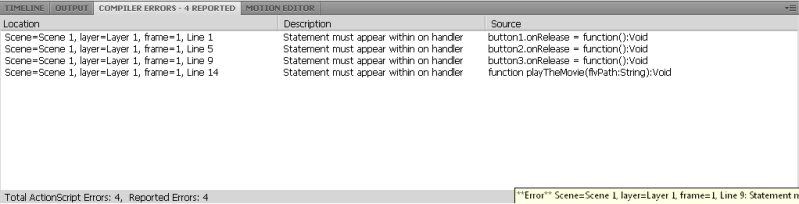
I seem to be having this problem at the moment, i'm using CS4, currently Actionscript 3, and I'm getting this:
----------------
Now playing: Boards Of Canada - Smokes Quantity
via FoxyTunes
Last edited by Mayato; 04-26-2009 at 05:54 PM.
Reason: Mistake.
-
Right, I've managed to read my way through that and fix it, now it's this:
**Warning** The linkage identifier
'FLVPlayback' was already assigned to the symbol 'movies/xxxxxxxx', and cannot
be assigned to the symbol 'movies/xxxxxxxx', since linkage identifiers must be
unique.
When I select the properties for the video clips the Indentifier is grayed out
and can't be changed. How do you create unique identifiers for video clips so
there are no conflicts?
 Originally Posted by Mayato

Hey, this has been great so far, thanks! I seem to be having this problem at the moment, i'm using Flash CS4, currently Actionscript 3, and I'm getting this:

(I'm clearly new at this!)
----------------
Now playing: Boards Of Canada - Smokes Quantity
via FoxyTunes
-
Ok, if you're using AS3 this is going to be a bit trickier. Because of how AS3 uses event listeners you can't just pass in a variable. If you have the time then now would be a good chance for you to read up on custom event managers so that you would be able to add parameters to your mouse events.
However, there is a work around that you can use. It's not the best way (the custom event manager would be the best), but it will work.
What you want to do is something like this:
Code:
button1.addEventListener(MouseEvent.CLICK, playTheMovie);
button1.addEventListener(MouseEvent.CLICK, playTheMovie);
button1.addEventListener(MouseEvent.CLICK, playTheMovie);

function playTheMovie(me:MouseEvent):void
{
   switch(me.target.name)
   {
      case "button1":
         yourFlv_instanceName.contentPath = "sit";
         break;
      case "button2":
         yourFlv_instanceName.contentPath = "stand";
         break;
      case "button3":
         yourFlv_instanceName.contentPath = "hop";
         break;
      case default:
         yourFlv_instanceName.contentPath = "sit";
         break;
   }
   yourFlv_instanceName.play();
}
So basically whichever button you click the function "playTheMovie" gets called. It then checks the name of the button (button1, button2, or button3) and assigns the content path accordingly using the switch statement. When that is done it tells the FLV component to play the video.
-

I can now see the differences between AS2 and AS3, I'm tempted to jump back on to AS2, but I'd like to give this a go!
Last edited by Mayato; 04-26-2009 at 05:56 PM.
-
Right, this is doing strange things, God help me!

-
ok...so it doesn't look like those instance names are matching up to buttons on the stage...any way you can post your .fla file? I'll look at it and then explain what to do with it.
-
Sure, i'll send the working .fla, is it just the fla you need?
Last edited by Mayato; 04-26-2009 at 05:57 PM.
-
nah, just the fla should do
-
Last edited by Mayato; 04-26-2009 at 05:57 PM.
-
Ok,
So I set up a quick example w 3 buttons and flv files...all the flv files look the same, but this is working.
I went ahead and made a template file from scratch for you using the video object and NetConnection. This is a bit more advanced, but gives you much more control in the long run.
I have commented the ActionScript in the file also, so that should help explain what is actually going on.
Here are a couple of places to get good info for any questions with this:
http://livedocs.adobe.com/flash/9.0/...onnection.html
http://www.adobe.com/devnet/flash/qu...ta_cue_points/
You can download the files here:
http://www.megaupload.com/?d=M202XO8T
 Posting Permissions
- You may not post new threads
- You may not post replies
- You may not post attachments
- You may not edit your posts
-
Forum Rules
|
Click Here to Expand Forum to Full Width

|


 Reply With Quote