|

-
MX to MX 2004, Where'd Parameters menu go?

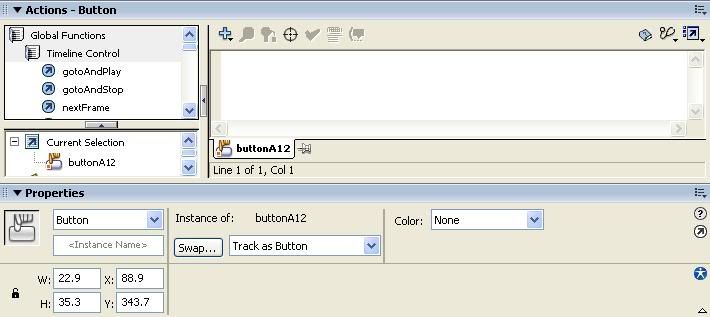
This is a MX screenshot
where is this Parameters tab in MX 2004......
I've tried double clicking the instance, etc...nothing
It's a button, btw
-
Is the parameters box hiding in a menu?
I checked all of the top menus (File, Modifiy, Window, etc.)
I checked in the edit instance screen, pretty much everywhere...
I would really appreciate someone's help on this
-
The parameters tab hasn't moved. It should be in the properties panel just as in Flash MX.
/Mirandir
-
 Originally Posted by Mirandir
The parameters tab hasn't moved. It should be in the properties panel just as in Flash MX.
/Mirandir
I can't seem to find it still
-
It seems like that is a standard button or at least Flash thinks it's a standard Flash button. And that doesn't have a parameters tab. Only the button component.
/Mirandir
-
I have 2004 MX Pro
witht eh 7.2 patch
if the version makes any difference
-
Originally Posted by Mirandir
It seems like that is a standard button or at least Flash thinks it's a standard Flash button. And that doesn't have a parameters tab. Only the button component.
/Mirandir
whats the difference between a button componenet and flash button component?
Where can I get a button component>? I need to have one so i can modify the parameters to make pickletter the Click Handler (as in tutorial)
-
Well what I meant is that it seems like it thinks it's a button symbol which is created using "convert to symbol"([F8])/ insert menu->new symbol... ([ctrl] + [F8]).
The Button component is found in the components panel in the menu: Window->development panels->components and there it's under "UI Components".
/Mirandir
-
Originally Posted by Mirandir
Well what I meant is that it seems like it thinks it's a button symbol which is created using "convert to symbol"([F8])/ insert menu->new symbol... ([ctrl] + [F8]).
The Button component is found in the components panel in the menu: Window->development panels->components and there it's under "UI Components".
/Mirandir
Thank You
I managed to get a button placed in and find the instance properties tab.
But, I have a new problem, this one is more tutorial specific.
The tutorial says it can create the remaining 25 buttons (letters of the alphabet) with a selection of actionscript code. The code was given on their website (http://64.233.179.104/search?q=cache...+runtime&hl=en) I can't manage to get it to duplicate the reamining letters. ( I need to set something called Click Handler to the value "pickletter")
My FLA can be found at:
http://www.ryanmetcalf.net/flash/hangman.fla

Last edited by ryanmetcalf; 07-29-2005 at 02:17 PM.
-
Components in MX 2004 work differently than they do in MX. For the purposes of that tutorial, I'd recommend you go to Macromedia.com and download the MX Components for MX 2004. You can find them here:
http://www.macromedia.com/cfusion/ex...009423&catid=0
-
Originally Posted by rdoyle720
Thanks for the help. I was able to get the button in but still it doesnt duplicate.
Code:
var alphabet = "ABCDEFGHIJKLMNOPQRSTUVWXYZ";
var nl = 1;
function createbuttons() {
for (i=1;i<26;i++) {
	bl = alphabet.substr(i,1);
	bn = "button"+bl;
	buttonA.duplicateMovieClip(bn,nl++);
	_root[bn].setLabel(bl);
	_root[bn].setSize(22,20);
    _root[bn]._x = buttonA._x + i*25;
	 }
}
createbuttons();
 Posting Permissions
- You may not post new threads
- You may not post replies
- You may not post attachments
- You may not edit your posts
-
Forum Rules
|
Click Here to Expand Forum to Full Width

|


 Reply With Quote